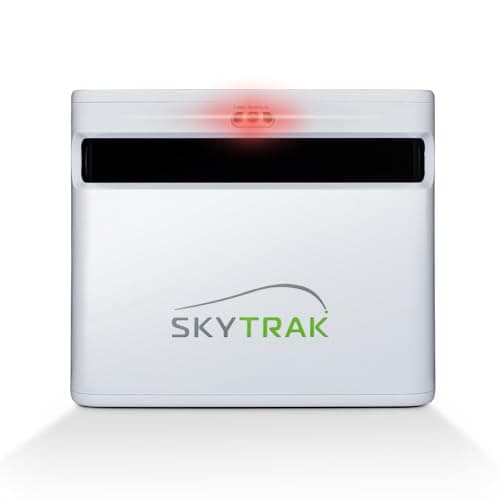
Every launch monitor on this site up to now has been a variation on the same idea: a small radar you set on the ground, aimed down the range, telling you how fast the ball left and roughly how far it went. The SkyTrak+ is a different class of tool. It reads the shot with a photometric camera as well as dual doppler radar, which means it can report the two things a pocket radar can only estimate — what the ball is actually spinning at, and what the club face was doing at impact. That capability is real, and so is the price: this is a four-figure purchase with an annual plan attached to the part most people buy it for.
What it is
The SkyTrak+ is a hybrid launch monitor and simulator front-end for a home bay. SkyTrak’s published specification pairs dual doppler radar with an advanced photometric camera system, and lists a data set well beyond anything else in this hub: on the ball side, carry and total distance, ball speed, back spin, side spin, descent angle, side angle, launch angle and shot shape; on the club side, club head speed, smash factor, club path, face angle and face-to-path. The unit runs on a rechargeable lithium-polymer battery that SkyTrak quotes at around four hours, connects over 2.4GHz WiFi or a direct mode, and works indoors or outdoors — though SkyTrak notes the full feature suite wants an internet connection.
Everything in the paragraph above is drawn from SkyTrak’s published specifications, not from a unit we put on a hitting mat. We don’t run a testing lab and we say so on how we rank; what we can do is read the spec honestly, weigh it against the rest of the category, and be straight about the running costs the marketing page puts in smaller type. SkyTrak also publishes an accuracy claim — precision within two yards of professional units costing upwards of $20,000, referencing third-party testing by GolfBays. Treat that as the manufacturer’s claim, sourced below, rather than a number we verified.
One thing to know before anything else: on Amazon the SkyTrak+ is now listed as the previous generation. SkyTrak has moved its flagship on to the newer ST MAX, and the SkyTrak+ has slid into the position the outgoing model always occupies — still sold new, still supported, and cheaper than the thing that replaced it. That reframes the whole buying decision, and we come back to it in the buyer’s guide below.
Where it shines
The camera is the reason to buy it. A pure doppler radar — the Garmin R10, the FlightScope Mevo, the PRGR — watches the ball fly and works backwards to a spin figure. That model is good enough to show you a trend, and for a lot of golfers a trend is plenty. A photometric camera looks at the ball itself, which is a fundamentally different job; our photometric vs radar explainer walks through why the two approaches disagree and where each is strongest. If you have ever wondered whether your wedges are spinning enough to hold a green, this is the class of tool that can answer it rather than approximate it.
The club data is the second, quieter reason. Club path, face angle and face-to-path are the numbers that explain whythe ball did what it did — they turn “that one went right again” into a face-to-path figure you can actually work on. No pocket radar in this hub reports them; the PRGR gives you speed and smash factor and stops, and our data explainer is largely about getting the most from that shorter list. If you are the kind of golfer who takes lesson notes home and wants to check whether the change held, the SkyTrak+ measures the thing the lesson was about.
Third, it is built to drive a real simulator rather than to bolt a token one on. The bundled sim function on a range radar is a bonus feature; SkyTrak’s software is the point of the product, with tiered course libraries and game-improvement tools built around the unit. If your plan is a garage bay with a mat, a net or an impact screen, and winter rounds on real courses, this is designed for exactly that build — the pieces of which we break down in the home simulator roundup.
Where it falls short
Start with the running cost, because it is the thing buyers most often miss. SkyTrak ships a free Basicmembership with the unit — that covers the SkyTrak driving range, the Sim Club and PinSeeker access, so you are not locked out of hitting balls and seeing numbers on day one. But the features most people picture when they imagine owning a simulator — playing real courses, bag mapping, the structured game-improvement library — sit behind the paid Essential, Core and Elite tiers. Published tier prices spanned roughly $100 to roughly $600 a year across SkyTrak’s own pages when we checked, and they discount them periodically, so budget from the current page rather than from any figure in an article — including this one.
Second, it asks more of your space and your setup than a radar does. A camera unit sits level beside the ball at a specified distance rather than several feet behind you, so an indoor bay needs to be laid out around it, and the quoted four-hour battery makes it a plug-it-in-in-the-bay device rather than a grab-it-on-the-way-to-the-range one. If “portable” to you means it lives in the golf bag, this is not that; the units in our portable roundup are.
Third, and most honestly: it is the outgoing model. Being previous-generation is exactly why the price is what it is, and an outgoing flagship is often the best value in any category — but it does mean the newest hardware, and whatever SkyTrak builds specifically for the ST MAX, is one model up. If you are the buyer who is unhappy the moment something newer exists, know that going in.
Who should buy it
Buy the SkyTrak+ if you are building a home bay you will genuinely use through the winter, you want measured spin and real club-face numbers rather than modeled ones, and you have already made peace with an annual plan for course play. The golfer this suits is usually a few years into taking the game seriously: mid-handicap or better, working on a specific fault, tired of guessing at wedge spin, and prepared to spend simulator money to stop guessing. Our are launch monitors worth it guide is the honest gut-check to read first if that description only half fits.
It is also the right buy if the simulator is the point rather than a bonus. If what you actually want is to play real courses at home on a screen, a unit designed around a course library and the software to drive it will be more satisfying than a range radar with a light sim attached — and the outgoing-model price makes that ambition cheaper than it was a generation ago.
Who should skip it
Skip it if your honest use case is the driving range. If you want carry distances per club so you stop clubbing yourself off a best-ever number, a pocket radar does that for a fraction of the price and fits in the bag — look at the field in our under-$1,000 roundup instead. Skip it too if a recurring fee is a deal-breaker on principle: the free Basic tier is real, but you will be looking at the locked features every time you switch it on, and the units in our no-subscription roundupnever send a renewal notice at all. And skip it if you want measured spin plus shot video specifically — the Rapsodo MLM2PRO is built around camera video at a much lower entry price, with its own membership caveat. Match the tool to the job: the SkyTrak+ is a home-bay instrument, not a range accessory.
What the camera actually buys you
The gap between a modeled number and a measured one is easiest to understand with spin. A radar infers spin from how the ball behaves in flight, which works well when the flight is normal and gets less reliable exactly when you most want the truth — a knifed wedge, a ball hit in a net where there is no flight to read, a strike off the bottom grooves. A photometric camera reads the ball as it leaves, so an indoor bay with three feet of ball flight is not a handicap. That is the single biggest practical reason a camera unit belongs indoors and a radar belongs outdoors, and it is why the SkyTrak+ makes sense in a garage in February in a way a pocket doppler does not. On the club side there is no comparison to make: face angle and club path are not numbers a ball-flight radar in this price class reports at all.
What it costs to own
Price the plan alongside the box. We keep dollar figures qualitative in prose on purpose — the live price renders on the card above, refreshed daily, and degrades to “check price” rather than showing you a stale number — but the shape of the cost is worth stating plainly. The SkyTrak+ is a four-figure purchase, several times what a pocket radar costs, and the course play that most buyers actually want is an annual plan on top. Over three or four years of ownership the plan is not a rounding error; it is a meaningful fraction of the hardware. Run it through our cost-of-a-home-setup breakdown along with the mat, the net or screen, and the space you are giving up, and decide against the real total rather than the sticker.
The previous-generation question
SkyTrak’s current flagship is the ST MAX; the SkyTrak+ is the model it replaced, and Amazon labels it that way. Our view is that this is a feature of the buy, not a defect, with one caveat. The feature: outgoing flagships are where the value lives, and a unit whose spec sheet was aspirational eighteen months ago has not become worse at reading a golf ball. The caveat: check what you are clicking buy on. SkyTrak listings include standalone units and simulator bundles at similar prices, and a bundle’s contents are not always obvious from the title, so read the listing rather than assuming. The buy link above goes to the standalone SkyTrak+ unit specifically.
How it fits a home bay
A launch monitor is one component. Around the SkyTrak+ you will want a hitting surface that does not punish your joints, a net or an impact screen with a sensible safety margin, and — if the goal is projected course play — a projector and a machine to run the software. Plan the room around where the camera has to sit, not the other way around, and be realistic about ceiling height before anything else: a bay you cannot make a full swing in is an expensive putting studio. The home simulator roundup covers the net and mat pieces we would pair with it, and where the money is best spent first if you are building the bay in stages.