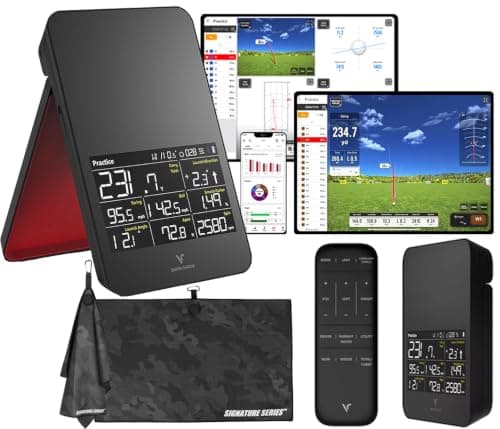
The Voice Caddie SC4 Pro is the launch monitor for the golfer who wants numbers at the range without carrying a phone, an app account or a subscription. It’s a self-contained doppler radar with its own built-in display, so you set it down, swing, and read your ball speed and carry off the unit itself — no pairing, no login, no renewal notice. That standalone simplicity is the whole pitch, and for a specific kind of practicer it’s exactly the right one.
What it is
It’s a portable doppler personal launch monitor: a small, battery-friendly radar that reads your shot in flight and shows the core numbers on an integrated screen rather than pushing them to a phone. Voice Caddie sells it as a monitor-and-simulator bundle, so a basic home-simulator function is part of the package — but the everyday job most owners buy it for is straightforward: carry distance, ball speed and the handful of figures that tell you whether a range session is actually going anywhere. Because it runs on its own display, there’s no app tier to unlock and nothing gated behind a membership; what the unit shows is what you paid for. Everything here is drawn from Voice Caddie’s published specifications and how a doppler unit reads a shot — we don’t run a testing lab and don’t pretend to.
In hardware terms it’s a doppler unit — the same family of radar as the Garmin R10, the FlightScope Mevo and the PRGR — which means it reads the ball in flight and is happy outdoors with a few yards of clear space. What sets it apart from most of that group isn’t how it reads the shot but how it shows it: the numbers live on the device, not on your phone. That one design choice shapes everything about who it suits, and it’s the thread running through the rest of this review.
Where it shines
The standalone design is the real strength, and it’s easy to underrate until you’ve fumbled with a phone mount in cold hands. Because the SC4 Pro has its own screen, you’re not tethered to a tablet or juggling a Bluetooth connection that drops between shots; you glance down and the number is there. That makes it genuinely grab-and-go — and the monitor you actually pull out of the bag beats the more capable one that stays home because it needs a setup ritual.
For a range-practice improver, the data it gives is the data that matters most. Knowing your true carry per club is the single most useful thing a monitor can teach a mid-handicapper, because most amateurs club themselves off a best-ever number they hit once and come up short all day. The SC4 Pro puts that honest carry figure in front of you every swing, with no running cost attached and nothing to configure first.
The no-subscription, no-phone framing also removes the two frictions that quietly kill practice. There’s no yearly fee compounding in the background — the kind of cost we total in our home-setup breakdown— and there’s no dependence on your phone’s battery, storage or a flaky range signal. It’s also portable enough to move between the range and an indoor net, so it can double as the brain of a modest home practice corner if you add a net and a mat later. And because you read the data on the unit rather than a screen you have to keep charged and connected, a cold or bright day that would defeat a fiddly phone-based setup barely troubles it — the display is right there in your eyeline the moment you switch it on.
Where it falls short
Be honest about what a tidy all-in-one gives up. First, it’s a radar, so some figures — spin especially — are modeled rather than directly measured. Read spin as a trend, not a lab number; if optically measured spin is what you’re after, a camera unit like the Rapsodo MLM2PRO is built around exactly that, at the cost of its subscription.
Second, the simulator that comes in the bundle is a convenience, not an immersive projector-and- screen room. If your dream is playing famous courses in high-fidelity graphics on a big impact screen, understand that a self-contained personal unit’s simulator is a lighter experience than a full camera-plus-laptop build driving dedicated sim software. Buy the SC4 Pro for its numbers first and treat the sim as a bonus, not the headline.
Third, it’s less widely reviewed than the Garmin and Rapsodo, so there’s a smaller body of long-term owner feedback to lean on than you get with the category’s best-sellers. That’s not a fault in the hardware; it just means fewer independent voices to cross-check, which is worth knowing before you spend.
Who should buy it
Buy the SC4 Pro if you’re a range-practice improver who wants trustworthy carry and speed numbers on a screen you can read at a glance, with zero running cost and no phone in the loop. If the appeal of a launch monitor for you is “walk to the range, hit balls, see my real distances” — and the idea of managing an app, an account and a subscription actively puts you off — this self-contained unit fits that brief better than a monitor that assumes a tablet and a login. It’s also a sensible pick for a golfer building toward a simple home corner, because the same standalone unit that works at the range will read your shots into a net indoors. It sits in the sub-$1,000 field alongside the units in our budget roundup, so it’s a real-money purchase rather than an impulse buy — but for the phone-averse practicer it earns its place.
Who should skip it
Two golfers should look elsewhere. The first wants measured, lab-grade spin and shot video— the SC4 Pro’s radar models spin and there’s no camera replay, so a photometric unit like the Rapsodo is the honest answer, subscription and all. The second wants a full, immersive simulator: a projected course on a big screen with rich graphics and a deep course library. That’s a different, more expensive build — a camera monitor, a laptop, a projector and an impact screen — and asking a tidy all-in-one to be that room will disappoint. If you only want the cheapest possible speed check with nothing on a screen to set up at all, a pocket speed-only unit like the PRGR HS 130-A is narrower and cheaper still. Match the tool to the job: the SC4 Pro is the standalone range-numbers unit, not the sim room and not the spin lab.
Standalone screen vs a phone-based radar
The SC4 Pro’s defining choice is the built-in display, and it’s worth understanding what that trades against a phone-based radar like the Garmin R10. A phone unit uses your screen, so it can show richer graphs, longer history and a slicker interface — but it depends on your phone’s battery, a stable Bluetooth link and, for the R10, the Garmin Golf app (free for core data, paid for the home simulator). The SC4 Pro cuts all of that out: the numbers live on the unit, so nothing drops, nothing needs charging beyond the monitor, and nothing is gated behind an account. You give up the big, pretty phone interface; you gain a monitor that just works the moment you switch it on. Which matters more is a genuine question of temperament — some golfers love the app, some want it gone.
What it costs to own
The honest cost story here is the absence of one. Because the SC4 Pro is standalone and subscription-free, its true cost of ownership is essentially the unit and its batteries — there’s no membership compounding each year the way a camera unit’s can. We keep prices qualitative on purpose: live pricing renders on the card above and is refreshed daily, and when a figure can’t be verified you’ll see “check price” rather than a stale number, which is what you may see on this unit. What we’ll say plainly is that it belongs to the sub-$1,000 class, not the pocket-speed-monitor price class, so weigh it against the fuller-featured units at a similar level — the no-subscription roundup is where it competes hardest, because a fee-free unit is its natural home.
How it fits a home setup
A launch monitor is only ever one piece of a home practice station, and the SC4 Pro is a tidy brain for a modest one. Because it’s standalone, you can stand it up next to a net, hit balls, and read your carry off the unit without a laptop or a phone propped up somewhere — which for a quick winter session is genuinely less faff than a phone-based radar. What it won’t do is turn a garage into an immersive course simulator on its own; that dream still needs a projector, an impact screen and the software to drive them, and a camera unit is usually the better front-end for it. Add a ball-return net and a joint-friendly mat and you have a real practice corner — our home simulator roundup walks through the pieces and where the money is best spent first, and the cost breakdown totals what the whole station runs to.