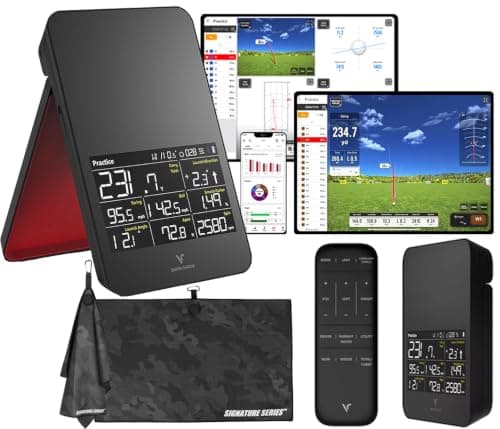
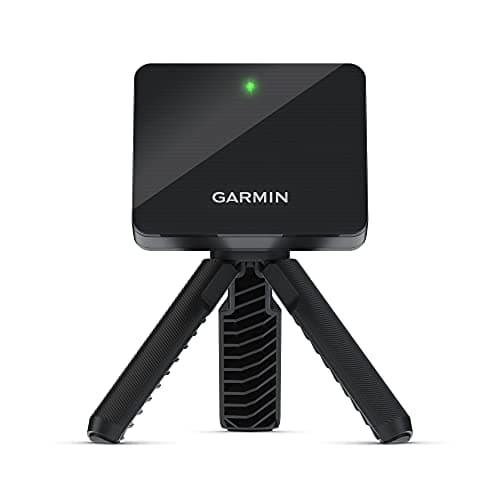
Both of these are portable doppler radarsthat put real launch data on a normal budget, and both are happy outdoors with a few yards of clear ball flight — but they differ on the one thing that shapes how a monitor feels to live with: the phone. The Garmin Approach R10 is a battery-powered radar that tripod-mounts, sets up in about a minute, and feeds ball speed, club speed, launch and estimated carry to the Garmin Golf app, whose core data is free. The Voice Caddie SC4 Prois a standalone radar that shows your carry, ball speed and core numbers on its own built-in display, with no phone, no app account and no subscription at all. Check the live prices above, then decide which matters more to you: the R10’s deeper app-driven data and a path to home simulator play, or the SC4 Pro’s switch-on-and-swing simplicity.
At a glance
| | Garmin Approach R10 | Voice Caddie SC4 Pro |
|---|
| Reads the shot | Doppler radar (estimates spin) | Doppler radar (models spin) |
| Where you read it | A paired phone or tablet (Garmin Golf app) | Its own built-in display, no phone |
| Subscription | Free core data; home sim (Home Tee Hero) is paid | None |
| Home simulator | Yes, on a paid tier | Basic sim bundled |
| Best for | The fuller budget data set and a path to home sim | No-phone, no-subscription range practice |
Choose the Garmin R10 if…
You want the fuller data set and a path to home simulator play, and you don’t mind a phone in the loop. The R10 runs its core launch numbers — ball speed, club speed, launch, estimated carry — on the freetier of the Garmin Golf app, so the sticker price is close to the whole price, and the app gives you shot-by-shot history and a slicker interface than a small on-unit screen can. It’s the unit we point most golfers toward first, it gets up to about 10 hours on a charge, and if you later want to play virtual courses indoors, its Home Tee Hero simulator is there on a paid tier. The trade is the dependency: your session leans on your phone’s battery and a stable Bluetooth link, and the home sim is a recurring cost if you use it. The full case is in our Garmin R10 review.
Choose the Voice Caddie SC4 Pro if…
You want numbers with no phone and no fee, full stop. The SC4 Pro is a self-contained doppler monitor with its own display, so you set it down, swing, and read your carry and ball speed off the unit itself — no pairing, no login, no renewal notice and nothing gated behind a membership. For a range-practice improver, the data it gives is the data that matters most: your honest carry per club, session after session, with zero running cost. It’s also sold as a monitor-and-simulator bundle, so a basic home-sim function is included. The trade against the R10 is reach: you give up the big, pretty phone interface, the deeper app history and the fuller Home Tee Hero simulator, and there’s a smaller body of independent owner feedback to lean on than the best-selling Garmin has. The full case is in our Voice Caddie SC4 Pro review.
Data depth and the app
This is the first real fork. Both units read your shot with the same family of doppler radar, so both are trustworthy for ball speed, club speed, launch and carry and both estimatespin rather than measuring it optically — read spin as a trend on either, not a lab number. Where they part is the screen. The R10 uses your phone or tablet, which means richer graphs, longer synced history and a more capable interface, at the cost of depending on that device. The SC4 Pro puts the core numbers on its own display, which is less to look at but nothing to charge, connect or log into. If you value a deep, browsable record of every session, the app-based R10 wins; if you value glancing down and seeing your carry with no setup ritual, the standalone SC4 Pro does.
The subscription, the simulator and running cost
Be precise here, because it’s where buyers get confused. The R10’s datais free — you are not required to pay anything to use it as a launch monitor — and only its at-home simulator, Home Tee Hero, is a paid tier. The SC4 Pro charges nothing at all: its bundled simulator is part of the package rather than a membership. So for pure practice data, both are effectively fee-free. The difference shows up if home course play is part of the plan: the R10 points you to a fuller, paid simulator experience run through a phone or laptop, while the SC4 Pro gives you a lighter, self-contained sim with no recurring cost. Decide whether you actually want to play courses at home before you weigh this — our cost-of-ownership breakdown shows how a simulator fee compounds if you keep it.
Portability and setup
Both are genuinely portable, battery-powered units you carry to the range, and neither is a fixed, ceiling-mounted system. The practical difference is the phone. The R10 tripod-mounts and pairs with a device, so a session is monitor plus phone plus a Bluetooth link — a minute to set up, and a little more to keep charged and connected. The SC4 Pro is a single self-contained box: stand it up, switch it on, and the number is there, which is a real advantage in cold hands, bright glare or a dead-signal range where a phone-based setup gets fiddly. The monitor you actually pull out of the bag beats the more capable one that stays home because it needs a ritual — and for some golfers the SC4 Pro’s no-phone simplicity is exactly what keeps them practicing.
Which one will you actually use?
The best monitor for you is the one you reach for often enough to change your practice, and that’s as much about temperament as data. Some golfers love the app: they want the browsable shot history, the bigger graphs and the sense of a growing record of every session, and the R10’s Garmin Golf app gives them that in a way a small on-unit screen can’t. Others actively resent the phone — the pairing, the battery anxiety, the login — and for them every layer between switching on and swinging is a reason to leave the monitor at home. If you’re the first golfer, the R10’s depth rewards you and its free core data means the richness costs nothing until you add the simulator. If you’re the second, the SC4 Pro’s standalone screen removes the exact frictions that quietly kill practice, and you’ll likely log more honest reps because there’s nothing to set up. Be honest about which of those two you are before you read another spec, because the unit you use weekly beats the one that impresses on paper.
The honest deciding factor
It comes down to reach versus simplicity. If you want the fullest budget data set, a browsable app history and a genuine path to playing courses at home, the R10 is the richer, more flexible tool, and the free core data means it costs nothing extra until you switch on the simulator. If you want honest carry and speed numbers on a screen you can read at a glance, with no phone, no account and no fee to think about ever, the SC4 Pro is the cleaner answer. Both sit in the same sub-$1,000 budget field, so weigh them against the rest of it in our best under $1,000 roundupbefore you commit. A useful gut check: picture your last three range sessions and ask whether a phone in your hand made them better or got in the way — that answer tends to decide this more honestly than any feature list, because both units read the shot with the same doppler radar and it’s the screen, not the sensor, that separates them. Neither is a five-figure professional unit, and we don’t lab-test — this is drawn from the manufacturers’ published specs and how each device captures a shot.
Skip the decision entirely if…
Neither is the right answer if what you actually want is optically measured spin and shot video. Both are pure doppler radars, so measured spin and a swing replay aren’t what they do — a camera unit like the Rapsodo MLM2PRO is built around exactly that, at the cost of its subscription. And if you only want the cheapest possible speed check with nothing to set up, a pocket speed-only unit like the PRGR HS 130-A is narrower and cheaper still. Match the tool to the job: this pair is for the golfer choosing between an app-driven radar and a standalone one, not the spin lab and not the bare speed trainer.